Why Developers Hate Pomodoro (And What to Use Instead)
Why Developers Hate Pomodoro (And What to Use Instead)
Open any programming forum. Reddit, Hacker News, Stack Overflow. Search "Pomodoro technique." You'll find a graveyard of frustration.
"The timer goes off right when I finally understand the bug."
"I spend 15 minutes loading the codebase into my head, then I get 10 minutes of work before the bell."
"I tried it for a week. My productivity dropped 40%."
These aren't isolated complaints. They're the majority opinion among developers. The Pomodoro Technique—beloved by students and praised in productivity blogs—fails spectacularly for programming work.
And it's not because developers are doing it wrong. It's because the technique was designed for a fundamentally different type of cognitive work. As Paul Graham argues in his essay Maker's Schedule, Manager's Schedule, programmers need long, uninterrupted stretches to be productive—something rigid timers inherently prevent.
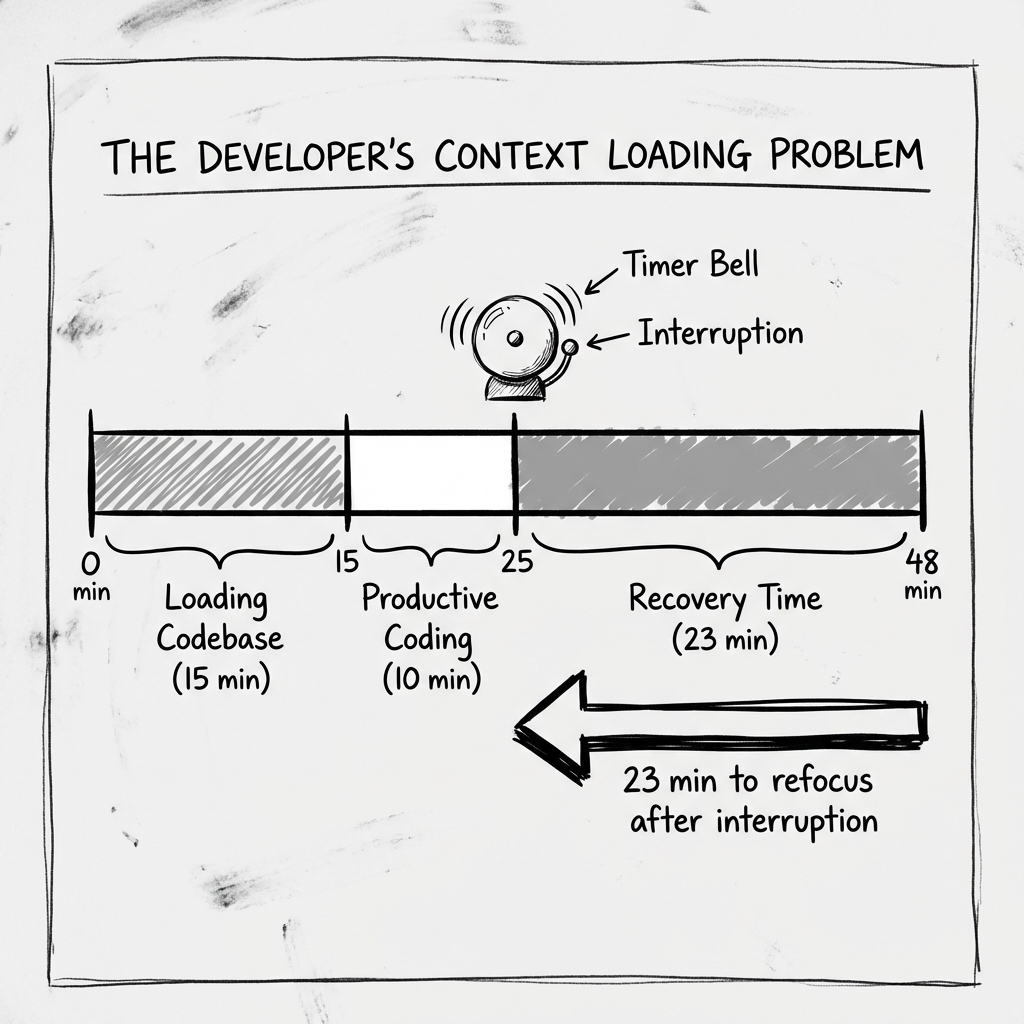
The Loading Problem
Let's talk about what actually happens when you sit down to code.
Programming isn't like writing emails or processing invoices. Before you can make meaningful progress, you need to build a mental model of the code you're working with.
This loading process is slow and expensive.
You need to understand:
- The current state of the codebase
- How this file relates to other files
- What the function is supposed to do
- What edge cases need handling
- Recent changes that might affect this code
- The specific bug or feature you're addressing
Depending on the complexity, this loading process takes 10 to 25 minutes. Studies on programmer productivity confirm this—context establishment is a significant portion of development time.
Here's the brutal math:
- Pomodoro session: 25 minutes
- Loading time: 15-20 minutes
- Actual productive coding: 5-10 minutes
That's a 60-80% overhead on every single session. You're spending most of your time getting to the place where you can work, not actually working. (For more on why 25 minutes was chosen in the first place, the answer has more to do with a kitchen timer than cognitive science.)
And it gets worse.
The Context Switch Tax
At the end of that 25 minutes, the Pomodoro bell rings. You're supposed to take a 5-minute break.
What happens to the mental model you just built?
It starts to decay immediately. Research on attention and working memory shows that complex contextual information—exactly the kind programmers hold while coding—begins degrading within seconds of disengagement.
A 5-minute break isn't long enough to rest but is plenty long to forget.
When you come back, you don't pick up where you left off. You start the loading process again. Maybe not completely from scratch, but enough that you lose another 5-10 minutes getting reoriented.
The 23-minute recovery study you might have seen cited—from Gloria Mark's research at UC Irvine, documented in her book Attention Span—applies here. The Pomodoro Technique treats breaks as restorative. For programming, they're destructive.
For more on the science behind this, see The Neuroscience of Flow: Why the 25-Minute Bell is a Trap.
Why Flow State Matters for Developers
Here's what non-programmers often don't understand: the best coding happens in flow state.
Flow is the psychological state where you lose track of time, external concerns disappear, and performance peaks. Athletes call it "being in the zone." Musicians call it "locked in." Programmers call it "finally getting somewhere."
In flow state, developers can:
- Hold more of the codebase in working memory
- See patterns and solutions that are invisible otherwise
- Write code faster with fewer errors
- Make connections between disparate parts of the system
Flow state is where the magic happens. It's where the 10x developer productivity comes from—not working 10x longer, but working in flow 10x more often.
The problem: flow state requires uninterrupted focus for at least 15-20 minutes to achieve. Often longer.
The Pomodoro assumption: 25 minutes is enough time to do meaningful work.
The programming reality: 25 minutes is barely enough time to get INTO flow state. The bell rings just as you're becoming productive.
The Reddit Consensus
I want to share some actual developer feedback. These are representative of thousands of similar comments across programming communities.
"Pomodoro is fantastic for tasks where you don't need to maintain state. It's terrible for programming where the whole job IS maintaining state." — r/programming
"After the bell I'd be more tired than when I started because I have to tear down and rebuild my mental model. Exhausting." — Hacker News
"I timed my natural work patterns. I consistently worked in 90-minute blocks before naturally wanting a break. Pomodoro was cutting me off at 1/4 of my natural rhythm." — r/productivity
"The people who love Pomodoro for coding are either doing trivial code or ignoring the bell. Neither is really using the technique." — Stack Overflow
The pattern is clear. Developers who try Pomodoro either abandon it quickly or adapt it beyond recognition—extending sessions to 50, 60, or 90 minutes.
At that point, you're not doing Pomodoro anymore. You're just working with occasional breaks.
What Developers Actually Need
Based on research and real-world developer experience, here's what actually supports programming productivity:
1. Longer Focus Blocks
The research on ultradian rhythms suggests the natural human focus cycle is closer to 90 minutes than 25. After about 90 minutes of intense cognitive work, the brain genuinely needs recovery.
For developers, this means:
- 45-90 minute focus sessions
- Breaks dictated by natural pause points, not timers
- Respect for the loading time investment
2. Flexible Break Timing
Instead of forced breaks at arbitrary intervals, breaks should happen at natural completion points:
- After committing a working change
- After solving a particular problem
- After tests pass
- When you genuinely feel mental fatigue
This requires self-awareness, but it prevents the mid-thought interruption that destroys flow.
3. Context Preservation
If you're going to take a break, leave yourself a trail back to context:
- Write a quick TODO comment about what you were doing
- Leave the cursor on the line you were working on
- Keep the debugging state in place
- Jot down your current theory about the bug
This "cognitive save state" dramatically reduces the reload time when you return.
4. Protection From External Interruption
The real productivity killers for developers aren't self-imposed breaks—they're external interruptions. Slack messages. Email notifications. Colleagues stopping by.
Block these more aggressively than you manage your break rhythm. A 90-minute focus session with no notifications beats perfectly scheduled Pomodoro sessions with constant pings.
The Extended Focus Alternative
Here's a developer-friendly productivity system that's gained traction:
The 60-30-10 Block:
- 60 minutes of uninterrupted focus
- 30 minutes of longer focus or code review
- 10 minutes of genuine break
This gives enough time to load context, achieve flow, and produce meaningful output before the natural fatigue point.
The Category-Aware Focus Session:
Instead of timing by minutes, time by work type:
- Building: feature development, architecture, new code
- Maintaining: bug fixes, refactoring, updates
- Delivering: code review, documentation, deployment
Pre-selecting your work category eliminates the "what should I work on?" decision paralysis and keeps you in a consistent type of work for the full session.
Ready to try extended focus sessions with category tracking? Give The Boring Clock a try—it's built for exactly this kind of developer workflow.
The Flow-Protective Timer:
Use a timer that counts your focus time without interrupting it. No bells—just a running count that shows how long you've been in the zone.
This provides the accountability and awareness of time tracking without the productivity-destroying interruptions.
When you naturally break from flow, you see "2h 15m of focus" and feel accomplished rather than guilty about "missing" a break.
Making the Switch
If you've been trying to force Pomodoro to work for your development work, here's how to transition:
-
Week 1: Observation — Don't change anything. Just track your natural work patterns using a tool like WakaTime or Toggl. When do you naturally take breaks? How long do your focus sessions last naturally? When do you feel most productive?
-
Week 2: Extended Sessions — Switch to 45-minute minimum sessions. No bells. Just a timer you can glance at when you want to know how long you've been working.
-
Week 3: Category Tracking — Pre-select your work type before each session. At the end of the week, look at how your time was distributed. Are you spending enough time on each type of work?
-
Week 4: Refinement — Based on your data, adjust session length and timing. Some developers settle on 60-minute blocks. Others prefer 90. Find your rhythm.
For more alternatives to Pomodoro, see 5 Pomodoro Technique Alternatives for When 25 Minutes Isn't Enough.
The Real Lesson
The Pomodoro Technique isn't bad—it's just not universal.
It works great for:
- Administrative tasks with clear boundaries
- Studying where breaks improve retention
- Work that doesn't require deep context loading
- People who tend to overwork without structure
It works terribly for:
- Programming and complex problem-solving
- Creative work requiring sustained immersion
- Any task where context loading takes significant time
- People who are naturally capable of self-regulating breaks
The productivity world loves one-size-fits-all solutions. They're easy to market, easy to explain, and easy to implement.
But developer productivity is its own domain. The cognitive demands are specific. The flow requirements are extreme. The context costs are real.
You wouldn't use a calculator designed for basic arithmetic to solve differential equations. Don't use a productivity system designed for task processing to support complex creative work.
Your Move
Here's what I want you to try next week:
Drop the 25-minute timer. Set a 60-minute timer instead—or just use a stopwatch.
Before you start, select what category of development work you're doing. Building something new? Fixing something broken? Reviewing someone else's code?
Let yourself get into flow. When you naturally want to break, break. Check how long you actually worked.
At the end of the week, look at your total focus time. Compare it to a typical "Pomodoro week."
I predict two things:
- Your total productive hours will be higher
- Your code output will be significantly better
Not because you worked more—but because you finally let your brain do what it's good at: sustained, deep, uninterrupted problem solving.
That 25-minute bell was never helping you. It was interrupting you.
Time to let it go.
You might also like
The Founder's First Two Hours: Why Checking Email Last Multiplies Your Output
Your first two hours determine your entire day. Learn why successful founders protect their morning for high-leverage work and how to design a routine that sticks.
How to Structure Your Ideal Focus Block: A Step-by-Step Template
Master the art of deep work with this practical focus block template. Learn exactly how to prepare, execute, and close each session for maximum productivity.
Why 25 Minutes Might Kill Your Flow (And How the 90-Minute Ultradian Cycle Works)
Discover the science behind 90-minute work cycles and why they may produce better results than traditional 25-minute Pomodoro sessions for deep work.
Ready to take control of your focus?
Stop letting time slip away. The Boring Clock helps you track where your hours actually go, categorized by Building, Promoting, and Delivering.