The Weekly Review System: How to Analyze Your Productivity Data
The Weekly Review System: How to Analyze Your Productivity Data
Daily tracking keeps you accountable. Weekly reviewing makes you strategic.
Most people who track their time never review it. They log sessions, accumulate data, and then... nothing. The information sits unused while they continue making the same allocation mistakes week after week.
The weekly review is where data becomes decisions. It's where patterns become visible and adjustments become intentional. David Allen made this a cornerstone of his Getting Things Done (GTD) methodology, calling the weekly review "the master key to the system."
This isn't complicated. It takes 15-30 minutes. And it might be the highest-leverage ritual you can add to your productivity system.
Why Weekly, Not Daily?
Daily reviews are too granular. A single day isn't representative—you might be sick, traveling, or in a meeting-heavy exception period. Daily data shows noise more than signal.
Weekly reviews offer:
- Pattern visibility: How do days compare? What's the trend?
- Strategic scope: Are you investing in the right categories?
- Adjustment opportunity: Enough time to course-correct without overreacting
- Completion cycles: Most projects unfold across days, not hours
One week is enough data to identify patterns but not so much that problems compound excessively before correction.
The Five Essential Questions
Your weekly review should answer five questions:
Question 1: Did I spend enough time in each category?
Pull up your week's data. How many hours went to:
- Building — Product development, systems, infrastructure
- Promoting — Marketing, content, sales, audience
- Delivering — Customer work, operations, fulfillment
Compare this to your intention. If you planned to spend 15 hours Building and spent 8, you know where the gap is.
For more on the category framework, see Building vs Promoting vs Delivering.
Question 2: Which category was neglected?
There's almost always one category that gets squeezed. It's usually:
- Promoting for technical founders
- Building for service providers
- The category that's uncomfortable for you personally
Identify which category had the biggest gap between intention and reality. That's your leverage point for next week.
Question 3: What patterns do I see across days?
Look at your daily distribution:
| Day | Building | Promoting | Delivering | Total |
|---|---|---|---|---|
| Mon | 3.0 | 1.0 | 2.0 | 6.0 |
| Tue | 1.5 | 0.5 | 4.0 | 6.0 |
| Wed | 2.0 | 2.0 | 1.5 | 5.5 |
| Thu | 0.5 | 0.0 | 5.0 | 5.5 |
| Fri | 2.5 | 1.5 | 1.0 | 5.0 |
Pattern questions:
- Which day was most balanced? What made it work?
- Which day was most skewed? What caused that?
- Is there a day that consistently underperforms? What's different about it?
- Are mornings or afternoons more productive?
Patterns reveal structural issues. Maybe Thursdays are always bad because of a standing meeting. Maybe Mondays start strong but Fridays fade. These insights inform schedule adjustments.
Question 4: What should I prioritize next week?
Based on this week's imbalances and next week's goals, what matters most?
This isn't a full task list—it's identifying the 1-3 most important things that must happen.
Good examples:
- "Ship the landing page (Building)"
- "Publish 2 blog posts (Promoting)"
- "Complete client onboarding (Delivering)"
Each priority should be:
- Specific enough to be actionable
- Important enough to justify priority status
- Categorizable (which domain does it belong to?)
Question 5: Am I making progress on my A+ Task?
The A+ Task is your single most important priority—the bottleneck that limits everything else. It's the one thing that, if completed, would unlock disproportionate progress.
In your review, ask:
- What is my current A+ Task?
- How much time did I invest in it this week?
- Did other tasks crowd it out?
- Is it still the right A+ Task, or has the bottleneck shifted?
For more on identifying your A+ Task, see The A+ Task Method for Entrepreneurs.
The Review Process (Step by Step)
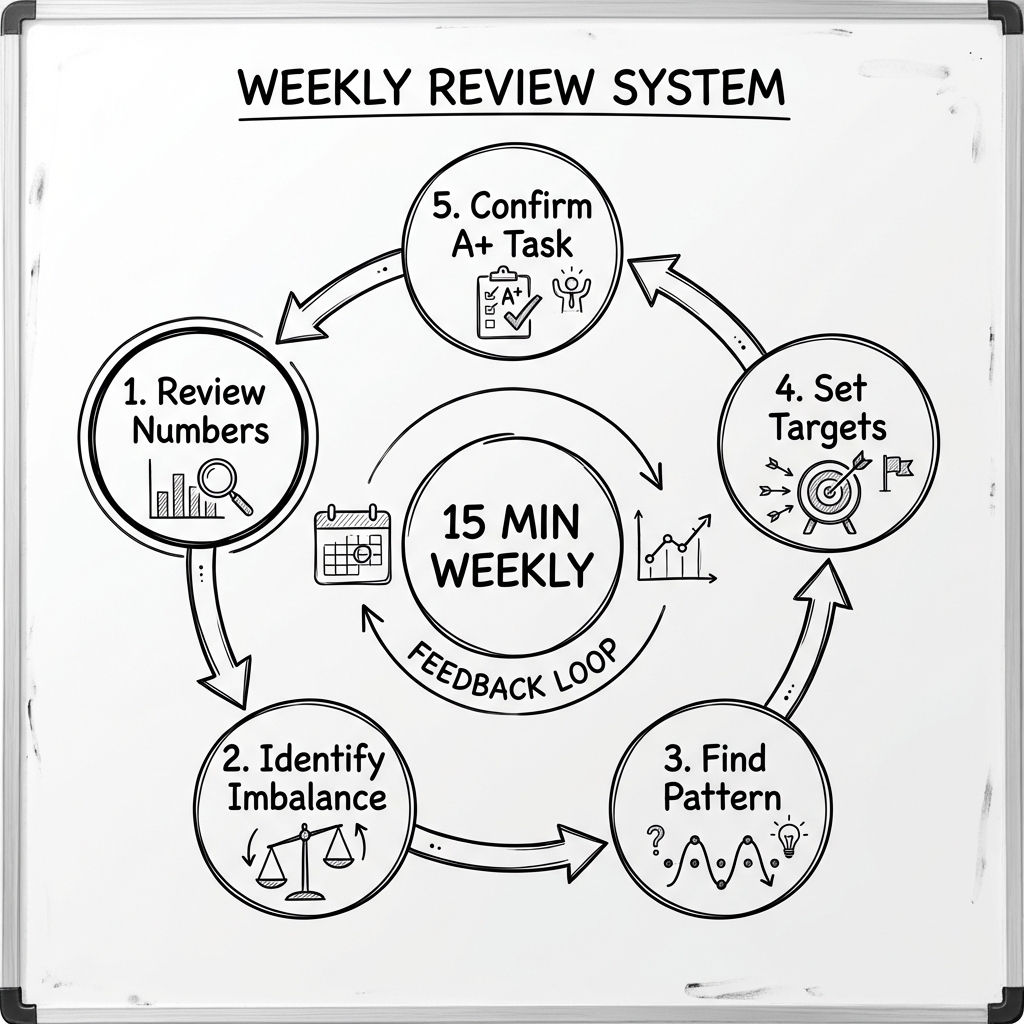
Here's a practical 15-minute weekly review process:
Preparation (2 minutes)
Timing: Sunday evening or Monday morning What you need: Your week's tracking data (timer logs, calendar, time reports)
Open your data. Have pen and paper ready for notes — or use a digital tool like Notion or Obsidian to keep a running review log.
Step 1: Review Numbers (3 minutes)
Look at your category totals:
- Total hours worked
- Hours per category
- Percentage breakdown
Compare to your targets. Where did you hit? Where did you miss?
Write down: "I invested X hours in Building, Y hours in Promoting, Z hours in Delivering."
Step 2: Identify Imbalance (3 minutes)
Which category was most underserved?
Why? Common causes include:
- Calendar conflicts (meetings in that category's time)
- Avoidance (uncomfortable category deprioritized)
- Reactive work expansion (one category eating others)
- Poor constraints (no protection for important categories)
Write down: "[Category] was neglected because [reason]."
Step 3: Find One Pattern (3 minutes)
Look at your daily distribution. Find one actionable pattern:
- "My best work happens before 10 AM"
- "Thursdays are always reactive due to team meetings"
- "I never touch Promoting after lunch"
- "Mondays start strong but derail after first email check"
Write down: "Pattern: [observation]. Implication: [what to change]."
Step 4: Set Next Week's Targets (2 minutes)
Based on your review, set category targets for the coming week:
Example:
- Building: 12 hours (currently 8, need to increase)
- Promoting: 10 hours (on target)
- Delivering: 10 hours (too high, need to reduce)
Write down specific numbers. Vague intentions don't work.
Step 5: Confirm A+ Task (2 minutes)
State your A+ Task for next week. It should be:
- The single most important thing
- Clearly defined
- Achievable with focused effort
Write down: "My A+ Task this week is [specific task]. I will invest [X] hours in it."
Making Reviews Sticker
Weekly reviews fail when they become optional. Here's how to make them stick:
1. Same Time, Same Place
Lock in a consistent review slot. Sunday 7 PM. Monday 8 AM. Whatever works—but same time every week.
Put it on your calendar as a recurring event. It's an appointment with yourself.
2. Make It a Ritual
Create ritual cues that trigger review mode:
- Specific location (desk, coffee shop, etc.)
- Specific beverage (Review Coffee Sunday)
- Specific music (lo-fi review playlist)
- Specific tool (physical notebook, specific app)
Rituals reduce friction and build habit.
3. Keep It Short
A 15-minute review done consistently beats a 60-minute review done occasionally.
Don't let perfectionism expand the review into a full productivity audit. Hit the five questions, set your targets, move on.
4. Celebrate Something
End each review by noting one thing that went well. Constant critique without acknowledgment burns out.
"I protected my morning focus block on 4/5 days. That's progress."
From Review to Action
The review itself is worthless if it doesn't change behavior.
Here's the connection:
- Review insight: "Promoting was neglected—only 3 hours vs. 10-hour target"
- Root cause: "I scheduled no specific Promoting time"
- Adjustment: "Block 2 hours for Promoting Tuesday and Thursday mornings"
- Next week's action: "Actually protect those blocks and decline conflicts"
- Next review: "Did Promoting improve? If not, why?"
Each week's review informs the next week's action, which informs the next review. It's a feedback loop that tightens over time.
Tracking Tools for Weekly Review
The review requires data. Here's how to get it:
Focus Timer with Category Tracking
If you use a timer that logs sessions by category (like The Boring Clock), your weekly data is already collected.
Review the weekly summary:
- Hours per category
- Daily breakdown
- Total sessions
Calendar Review
Your calendar shows planned time allocation. Compare calendar blocks to actual execution:
- Did you work during the blocked time?
- Was the block interrupted?
- Were categories respected?
Manual Logging
If you're not using a timer, estimate your time at day's end:
- "Today I spent ~3 hours Building, ~1 hour Promoting, ~2 hours Delivering"
Less precise but still useful for weekly patterns.
Advanced Review: Monthly and Quarterly
Weekly reviews handle tactical adjustments. Longer reviews handle strategic shifts.
Monthly Review (30 minutes)
- Review 4 weeks of data
- Identify multi-week patterns
- Assess progress on monthly objectives
- Adjust category targets if needed
Quarterly Review (60 minutes)
- Review 12 weeks of data
- Evaluate major project progress
- Reassess A+ Task and strategic bottleneck
- Set or adjust quarterly objectives
The principle scales: more data reveals larger patterns and warrants bigger adjustments.
What Changes Over Time
Consistent weekly reviews create compounding improvement:
Month 1: You discover your time allocation is far from what you imagined. "I thought I was building more than this."
Month 3: You've corrected obvious imbalances. Categories are more balanced. Patterns are clearer.
Month 6: Your intuition about time has improved. You plan more accurately. You protect important time proactively.
Month 12: Weekly review is automatic. You catch drift early. Your productivity has compounded significantly compared to reactive work.
The goal isn't perfection — it's continuous, data-driven improvement. As Tiago Forte describes in Building a Second Brain, the power of a review practice is that it turns scattered information into a trusted system you can rely on.
The Weekly Review Checklist
Use this checklist each week:
Preparation:
- Clear 15 minutes in calendar
- Pull up tracking data
- Have pen and paper ready
Review:
- Note hours per category
- Identify most neglected category and why
- Find one pattern across days
- Set category targets for next week
- Confirm A+ Task for next week
Action:
- Block time for neglected categories
- Schedule A+ Task sessions
- Celebrate one thing that went well
Print this out. Stick it where you'll see it on review day.
Start This Week
You don't need perfect tracking data to start reviewing. Even rough estimates are useful.
This Sunday:
- Estimate how you spent last week across Building, Promoting, and Delivering
- Answer the five questions as best you can
- Set rough targets for next week
- Pick one adjustment to make
Next week:
- Track your time more formally
- Review with real data
- See if your adjustment worked
- Make the next adjustment
You'll be amazed how quickly visibility translates to improvement.
Ready to start tracking and reviewing? The Boring Clock gives you the category data you need for powerful weekly reviews.
Daily work is where effort happens. Weekly reviews are where strategy happens.
Don't just track your time. Analyze it. Learn from it. Let it guide your next week's investment.
That feedback loop — work, track, review, adjust, repeat — is how ordinary effort becomes extraordinary results. It's the same principle behind every great productivity system, from GTD to Agile retrospectives.
Start reviewing. Start improving. Start this week.
You might also like
Stop Spending Time, Start Investing It: The ROI Framework for Productivity
Not all hours are equal. Some compound, others evaporate. Learn to evaluate your activities by their long-term returns and stop wasting focus on low-ROI tasks.
The Planning Fallacy: Why You Always Underestimate How Long Tasks Take
Learn why humans are hardwired to underestimate task duration, and discover practical techniques to create realistic time estimates using actual tracking data.
Stop Doing Low-Value Work: The Delete-Automate-Delegate Framework for Deep Work
Before you can do deep work, you need to eliminate shallow work. Learn Alex Hormozi's hierarchy: Delete first, then Automate, then Delegate what remains.
Ready to take control of your focus?
Stop letting time slip away. The Boring Clock helps you track where your hours actually go, categorized by Building, Promoting, and Delivering.