Best Pomodoro Timer for Entrepreneurs: Why Category Tracking Changes Everything
Pomofocus vs The Boring Clock: Which Focus Timer is Right for You?
Looking for an online focus timer? You've probably landed on Pomofocus — it's one of the most popular Pomodoro timers on the web. Clean interface, no signup required, dead simple to use.
But is it the right tool for your specific needs?
If you're a student tackling homework or someone processing routine tasks, Pomofocus might be perfect. If you're an entrepreneur, developer, or creative professional doing complex work, you might need something different.
Let's compare Pomofocus and The Boring Clock to help you choose.
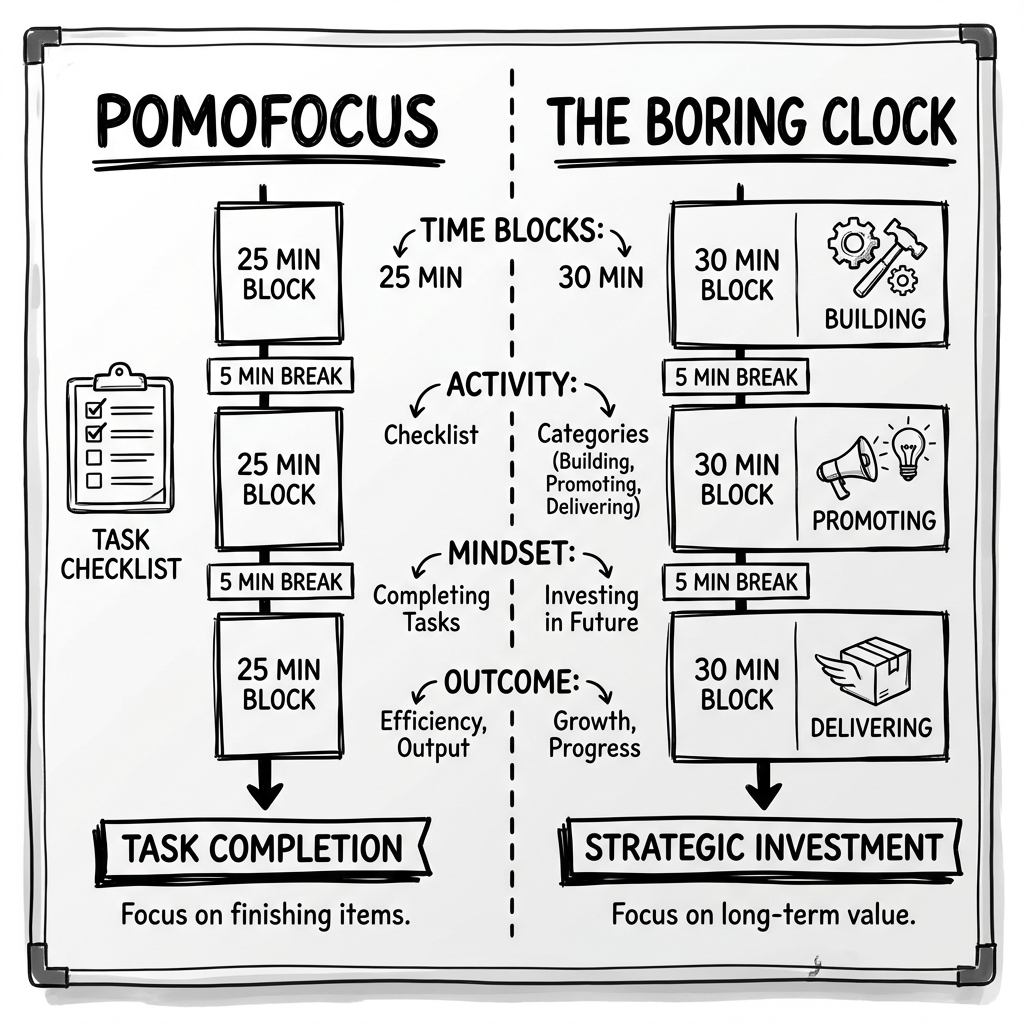
Quick Comparison Table
| Feature | Pomofocus | The Boring Clock |
|---|---|---|
| Timer Structure | Fixed 25/5/15 Pomodoro | Flexible 30-minute focus blocks |
| Category Tracking | ❌ No | ✅ Building/Promoting/Delivering |
| Weekly Reports | ❌ No | ✅ Yes |
| Task Lists | ✅ Yes | ❌ Category-based, not task-based |
| Account Required | Optional | ❌ No |
| Cost | Free | Free |
| Best For | Students, simple tasks | Entrepreneurs, strategic work |
| Philosophy | Traditional Pomodoro | Category-based time investment |
Pomofocus: What It Does Well
Pomofocus is a clean, minimalist implementation of the classic Pomodoro Technique.
Strengths:
1. True Pomodoro Experience
If you want authentic 25/5 Pomodoro with long breaks every 4 cycles, Pomofocus delivers exactly that. No modifications, no complexity—just the original method.
2. Simple Task Management
You can add tasks, estimate how many Pomodoros each will take, and check them off as you work. Great for to-do list enthusiasts.
3. Minimal Friction
No account required to start. Load the page, click start, work. Perfect for quick sessions without setup.
4. Clean Design
The interface is uncluttered and non-distracting. Timer front and center, everything else secondary.
Best use cases:
- Students doing homework
- People new to focus timers
- Routine tasks with clear completion points
- Quick sessions without needing history
The Boring Clock: What It Does Differently
The Boring Clock takes a different approach, built around category-based time investment rather than task completion.
Strengths:
1. Category Tracking (Building/Promoting/Delivering)
Before each session, you select your work category. This creates strategic awareness: are you balancing product development, marketing, and customer work?
2. Extended Focus Blocks
30-minute sessions instead of 25, giving you more time to achieve flow before breaks. Especially important for complex work requiring mental warmup.
3. Weekly Reports
See how your time distributed across categories over the week. Identify imbalances. Make data-driven adjustments.
4. Flexible Timing
No forced interruptions. When the timer ends, you choose whether to break or extend based on your current flow state.
Best use cases:
- Entrepreneurs balancing multiple domains
- Developers needing longer focus blocks
- Creative professionals doing deep work
- Anyone tracking time allocation strategically
The Philosophical Difference
These tools reflect different productivity philosophies.
Pomofocus philosophy:
- Break work into manageable chunks
- Frequent breaks maintain freshness
- Complete tasks one Pomodoro at a time
- Focus on individual session completion
The Boring Clock philosophy:
- Invest time in strategic categories
- Extended focus enables deeper work
- Track allocation, not just completion
- Focus on weekly portfolio balance
Neither is objectively "better." They solve different problems for different people.
Who Should Use Pomofocus
Students and learners: The 25-minute structure works well for studying material that changes frequently. Different subjects, different chapters, different problem sets—the forced breaks create natural transition points.
Task processors: If your work is primarily checking items off lists—emails, tickets, administrative tasks—Pomofocus's task integration helps you stay organized.
Pomodoro purists: If you've read Francesco Cirillo's book and want the authentic technique, Pomofocus delivers it faithfully.
Quick-session users: Need a timer right now without setup or accounts? Pomofocus gets you working in seconds.
People who need forced breaks: If you're the type who forgets to take breaks and burns out, Pomofocus's mandatory pauses help.
Who Should Use The Boring Clock
Entrepreneurs: If you're balancing Building, Promoting, and Delivering—and struggling to allocate time strategically—category tracking solves that problem.
For context on this framework, see Deconstructing Alex Hormozi's $100M Schedule.
Developers and engineers: 25-minute interruptions destroy code flow. 30-minute extended blocks give you time to load context AND work productively before breaks.
Creative professionals: Writers, designers, and artists often need longer immersion periods. The Boring Clock's flexible timing doesn't pull you out of flow artificially.
Strategy-focused workers: If you care more about "Am I investing time correctly?" than "How many tasks did I complete?", category tracking provides that insight.
Week-over-week optimizers: If you want to see patterns, track progress, and make weekly adjustments based on data, the reporting features support that workflow.
The Flow State Question
One key difference: how each tool handles flow states.
Flow state — a concept pioneered by psychologist Mihaly Csikszentmihalyi — is that deep, immersive focus where time disappears and work feels effortless. It typically takes 15-20 minutes to achieve and can be destroyed instantly by interruption.
Pomofocus approach: Timer rings at 25 minutes regardless of your state. You're expected to break even during flow.
The logic: breaks prevent burnout and maintain long-term productivity.
The risk: 25 minutes isn't always enough to reach flow, and interrupting flow destroys the momentum you worked hard to achieve.
The Boring Clock approach: Timer counts 30 minutes, giving more runway for flow. When it ends, you choose whether to continue or break.
The logic: respect flow when it happens; don't artificially interrupt productive states.
The risk: without forced breaks, some people work too long without rest.
Which matters for you?
If you rarely achieve flow or need structure to take breaks, Pomofocus's approach helps.
If you're doing deep creative or technical work where flow is the goal, The Boring Clock's approach prevents unnecessary interruption.
For more on flow science, see The Neuroscience of Flow: Why the 25-Minute Bell is a Trap.
The ADHD Consideration
For ADHD brains, the comparison shifts:
Pomofocus challenges for ADHD:
- 25 minutes may not account for the 15-minute warmup ADHD brains often need
- Forced breaks can be jarring when hyperfocus finally kicks in
- Task management requires decision-making that can cause paralysis
The Boring Clock advantages for ADHD:
- Category pre-selection eliminates "what should I work on?" decision fatigue
- 30-minute blocks give time for warmup AND productive work
- Flexible ending doesn't shatter hyperfocus
- Visual progress provides dopamine reinforcement
That said, some ADHD individuals prefer Pomofocus's strict structure. It depends on your specific challenges.
For deeper exploration, see Harnessing Hyperfocus: Why ADHD Brains Thrive with Extended Focus Blocks.
Feature Deep Dive: Category Tracking
The biggest differentiator is The Boring Clock's category system.
Before each session, you select:
- Building 🔨 — Product development, systems, infrastructure
- Promoting 📣 — Marketing, content, sales, outreach
- Delivering 📦 — Customer work, operations, fulfillment
This creates three benefits:
1. Forced Clarity
You can't start the timer without choosing a category. This eliminates vague "I'll work on stuff" sessions and creates clear focus scope.
2. Strategic Visibility
At week's end, you see: "I spent 20 hours Building, 5 hours Promoting, 15 hours Delivering." You can immediately identify imbalances.
3. Portfolio Thinking
You start thinking of time as an investment portfolio. "Am I overweight Building? Underweight Promoting?" The mental model shifts from task completion to strategic allocation.
Pomofocus doesn't offer this. You can complete 20 Pomodoros, but you won't know how they distributed across business domains.
Feature Deep Dive: Weekly Reports
The Boring Clock provides weekly summaries showing:
- Total focus hours
- Hours per category
- Percentage breakdown
- Daily patterns
Why this matters:
Without data, you rely on intuition about time allocation. And intuition is systematically biased—you remember some activities better than others, and internal clocks are notoriously unreliable.
Weekly reports correct for this. You see objective data about where your hours actually went.
Pomofocus tracks daily Pomodoros but doesn't provide weekly category analysis. You know you did 15 Pomodoros, but not whether that time was well-invested.
When to Use Both
These tools aren't mutually exclusive. Some workflows benefit from both:
Use Pomofocus for:
- Quick task processing sessions
- Studying or learning
- Times when you need forced structure
Use The Boring Clock for:
- Strategic work sessions
- Deep creative or technical work
- Tracking weekly category balance
Switching between tools based on work type is perfectly valid. Match the tool to the task.
Making Your Choice
Here's a decision framework:
Choose Pomofocus if:
- You're primarily completing defined tasks
- You want authentic Pomodoro methodology
- You need forced breaks to avoid overworking
- Simple timer with task lists is enough
- You don't need weekly strategic tracking
Choose The Boring Clock if:
- You're balancing multiple business domains
- You want to track time investment by category
- You do deep work requiring extended focus
- Weekly reports would help you optimize
- Traditional Pomodoro feels too interruptive
Try both if:
- You're unsure which philosophy suits you
- Your work varies between task-heavy and deep-work days
- You want to experiment with different approaches
Getting Started
If you choose Pomofocus:
- Go to pomofocus.io
- Click start
- Add tasks if desired
- Work in 25/5 cycles
If you choose The Boring Clock:
- Go to theboringclock.com
- Select your category (Building, Promoting, or Delivering)
- Start your 30-minute focus session
- Review weekly to see your category balance
Both are free. Both require zero setup. The best way to choose is to try each for a week and see which fits your work style.
The Right Tool for the Right Job
There's no universally "best" focus timer. There's only the right tool for your specific needs.
Pomofocus excels at structured task completion with classic Pomodoro methodology.
The Boring Clock excels at strategic time investment with category awareness and weekly optimization.
Choose based on what you're trying to achieve—not based on what's popular.
Your productivity system should serve your goals. Pick the timer that helps you reach them.
You might also like
5 Pomodoro Technique Alternatives for When 25 Minutes Isn't Enough
The Pomodoro Technique isn't for everyone. Discover 5 proven alternatives that might work better for developers, writers, and anyone who needs deeper focus blocks.
Welcome to The Boring Clock Blog
Introducing our blog where we share productivity tips, focus techniques, and insights about the Build-Promote-Deliver framework.
Ready to take control of your focus?
Stop letting time slip away. The Boring Clock helps you track where your hours actually go, categorized by Building, Promoting, and Delivering.